Choosing a Bible reading tracker app: eight things to check
What a Bible reading tracker app should do, and eight tests to run before you pick one: your canon, missed days, past readings, reminders, privacy and price.

The short answer
A Bible reading tracker app keeps a record of the chapters you have read and works out what comes next and how far you are. Eight checks separate a good one: it counts your Bible, from 66 books to 80; it works with any translation, paper included; a missed day leaves no backlog; you can log an earlier day and undo a tap; past reading counts without faking days; widgets and reminders never log or scold; you know where the record lives; and you know what costs money.
In this guide
“Bible reading tracker app” covers two kinds of thing: Bible apps that carry the text along with their own plans, and trackers that only keep the record. Either can be the right choice, and the difference between them matters more than any feature list. So rather than ranking apps, this page sets out eight checks you can run on any tracker in a few minutes.
One disclosure first. BibleRing, the app this site is for, is ours. The checks are written to apply to any app, we name no other app, and near the end we say plainly where BibleRing fits and where it does not.
- 66 to 80books, depending on whose Bible you read
- 1,189chapters to count in the Protestant Bible
- 1,334in the Catholic Bible
- 1,564in the Ethiopian Bible
Bible app or Bible tracker: what’s the difference?
A Bible app gives you the text to read, often with reading plans inside it; a Bible tracker gives you a record of what you have read, wherever you read it. The line between them can blur, so what matters is which of the two jobs you want done.
| Bible app | Bible tracker | |
|---|---|---|
| What it holds | The text, in the translations it offers | Your record: chapters, dates, notes |
| Where you read | In the app | Anywhere: paper, another app, an audio Bible |
| What it tracks | The plans you follow inside it | Chapters, against your whole Bible |
| Suits | Reading on your phone, one plan at a time | Reading on paper, in several places, or over years |
If you read from paper on some days and a phone on others, a tracker is the tool that sees all of it; if you only ever read in one app, its plans may be all the tracking you need. If you are not sure you want an app at all, our guide to tracking your Bible reading compares one with a printed chart and a spreadsheet.
What a Bible reading tracker app should tell you
A tracker earns its place by answering four questions without any arithmetic on your part:
- What you have read, chapter by chapter, so a book you half finished shows which half.
- What comes next, worked out from where you actually are.
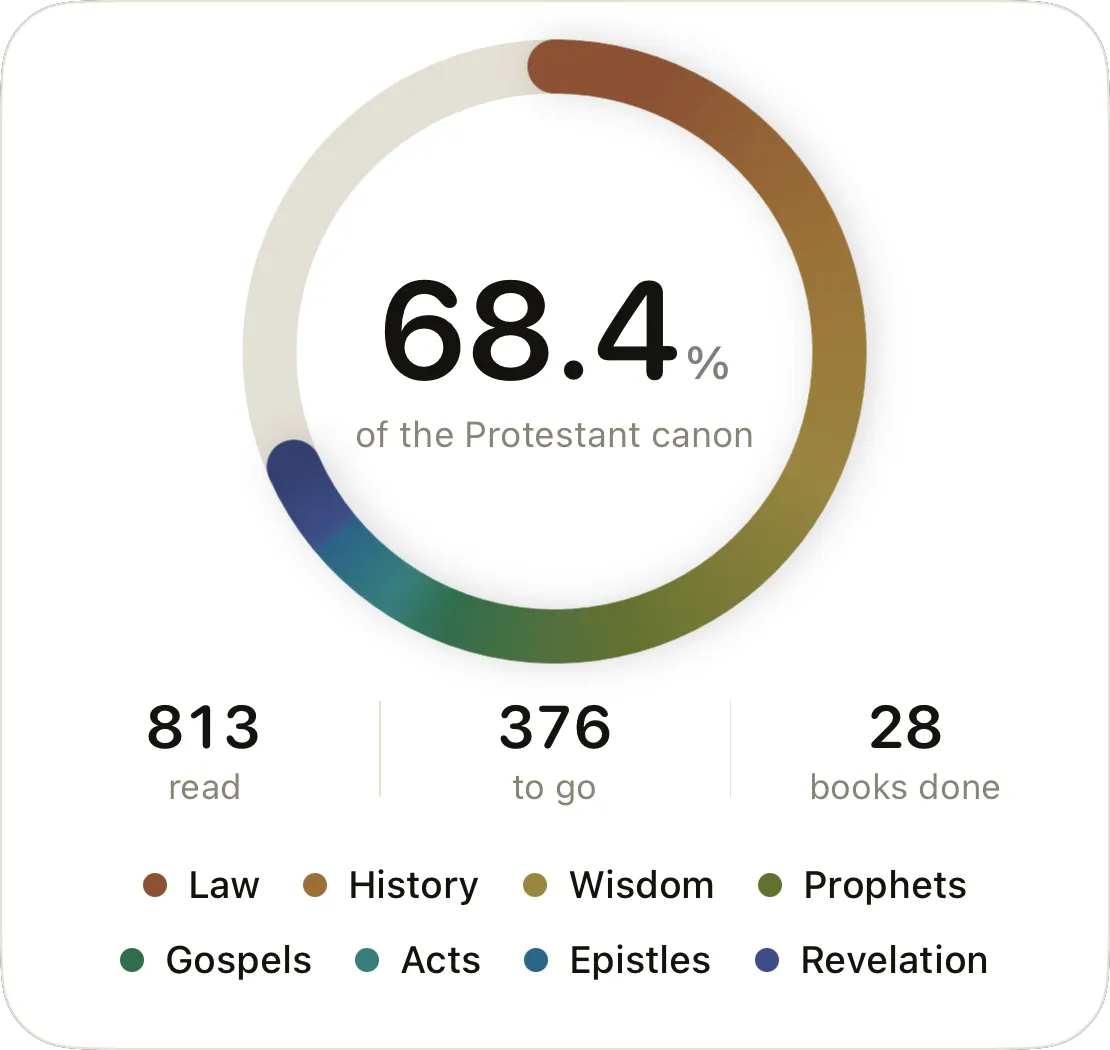
- How far you are, as a share of your whole Bible.
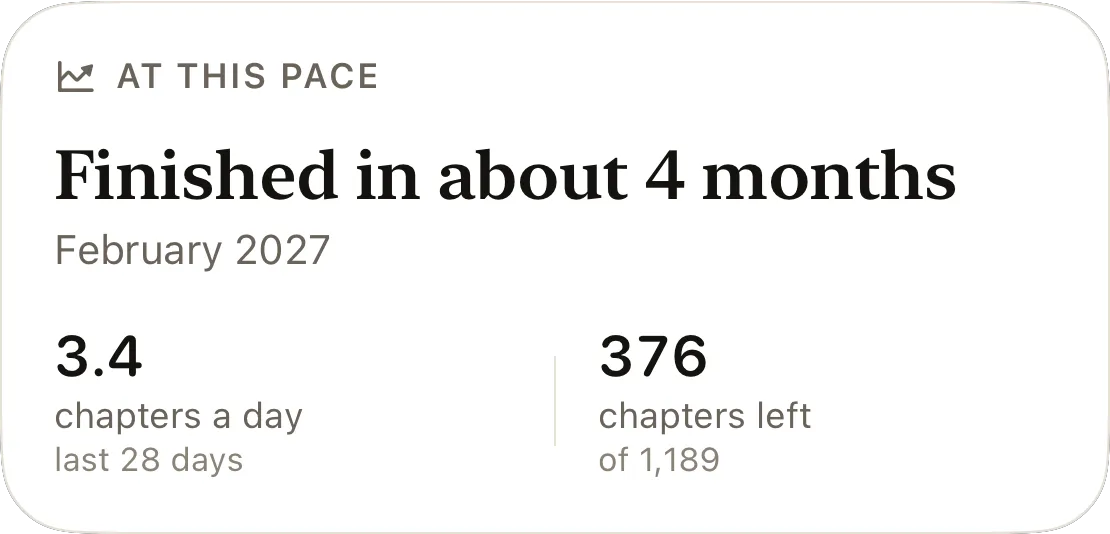
- How long is left, from the pace you really keep rather than one you set in January.
Each of the eight checks below is a way a tracker can get one of those answers wrong. Most have an answer you can see for yourself on a new install, rather than take a listing’s word for it.
Eight things to check in a Bible reading tracker app
1. It counts your Bible
A tracker is only accurate if it counts against the Bible you read, and for many readers that is not the 66-book Protestant Bible. Catholic, Orthodox and Ethiopian Bibles have more books and so more chapters, which changes what 100 percent means:
| Canon | Books | Chapters | Old + New Testament |
|---|---|---|---|
| Protestant | 66 | 1,189 | 929 + 260 |
| Catholic | 73 | 1,334 | 1,074 + 260 |
| With Apocrypha | 76 | 1,360 | 1,100 + 260 |
| Orthodox | 78 | 1,386 | 1,126 + 260 |
| Ethiopian | 80 | 1,564 | 1,304 + 260 |
The 73-book Catholic Bible includes Tobit, Judith, Wisdom, Sirach, Baruch and 1 and 2 Maccabees, which the Protestant Bible does not, along with longer versions of Esther (16 chapters rather than 10) and Daniel (14 rather than 12). That is 145 chapters a 66-book tracker has nowhere to put, so it can report 100 percent with all of Sirach still unread. Our guide to how many books are in the Bible explains where each tradition’s books come from.
To test it, choose your Bible in the settings, mark the first chapter of a book the Protestant Bible does not have (Tobit in a Catholic Bible, say, 3 Maccabees in an Orthodox one, or Enoch in the Ethiopian), and see whether the total and the percentage move. Then switch to another canon and back, and check that nothing you logged has gone.
2. It works with the Bible you already read
A tracker is most useful when it lets you log a chapter read anywhere: in any translation, on paper, or heard read aloud. An app that counted a chapter only once it had been read on its own screen would miss the Bible by your bed and the passage read in church.
To test it, mark a chapter read without opening its text. If you can, and it counts like any other, the app keeps the record rather than the book.
3. A missed day doesn’t become a backlog
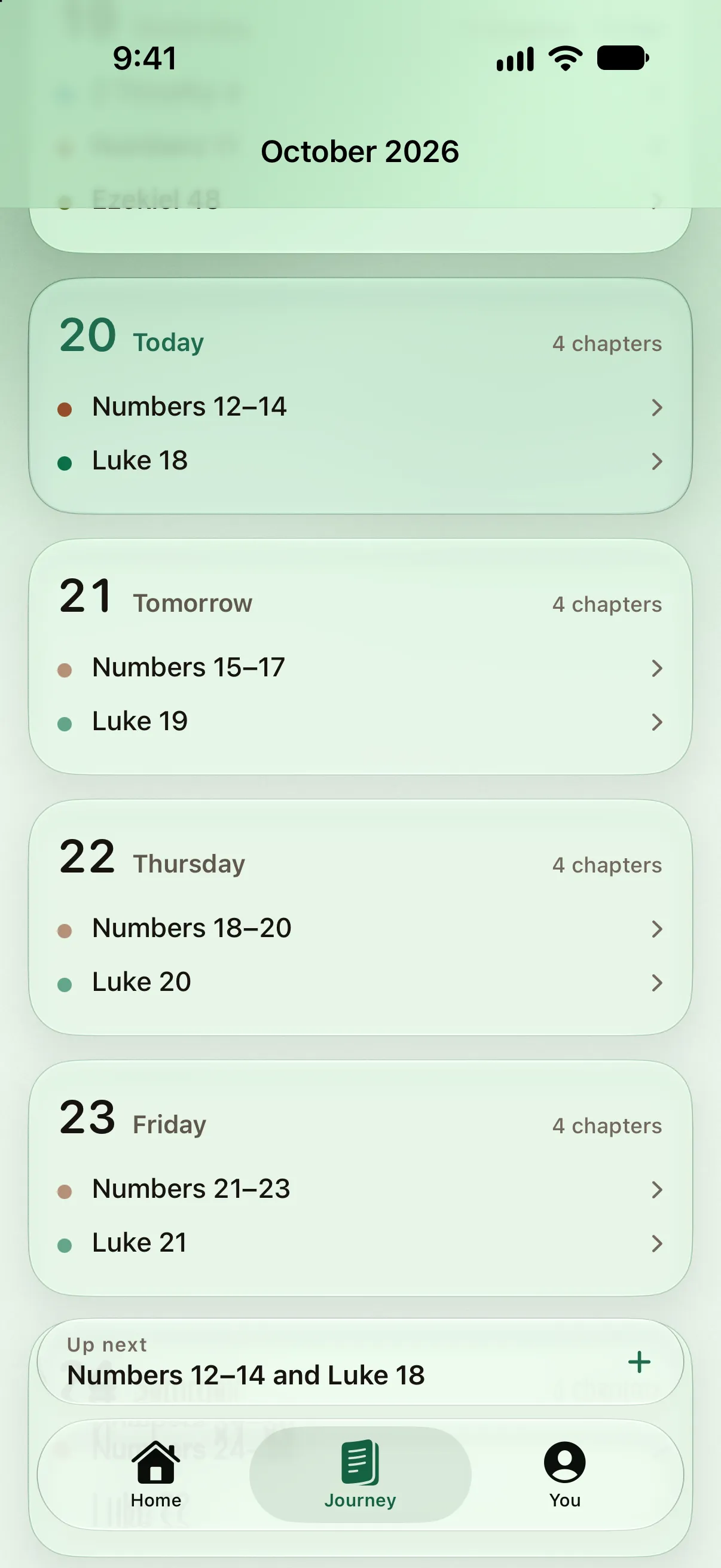
The morning after a day you did not read is where a plan’s design shows. Some plans are tied to the calendar: day 47 is day 47 whether or not you read days 44 to 46, so the missed readings wait in a pile. Others are tied to where you are: today’s reading starts at the next chapter you have not read, and a missed day simply passes.
Both have their uses. A calendar plan keeps you on the same page as a group reading the same dates; a plan that starts from where you are keeps one quiet week from becoming three weeks of catching up. It helps to know which kind an app uses before it matters. If a calendar plan has already left you behind, our guide to catching up on a Bible reading plan has ways back that do not mean starting over.
Ask the same of a streak, if the app counts one: does a single quiet day send a long run back to zero, or can one day pass? Our guide to Bible reading streaks looks at what the research says about both.
4. You can log an earlier day, and take back a mistaken tap
A reading record needs corrections. You read on paper during a trip and logged nothing, or you tapped Psalm 21 when you meant Psalm 12. A tracker that cannot take a reading for yesterday, or cannot take one back, slowly drifts away from what you actually read.
To test it, log a chapter for yesterday, then remove it. Two details are telling. Does removing it ask first, since a note may go with it? And if the mistaken tap finished a book or earned a badge, does that go too? A record that keeps a milestone you never reached has stopped being quite a record.
5. Chapters you read years ago can count
Few people start from nothing. Marking the books you have already read gives a truer percentage and a plan that skips what you have covered. But past reading is coverage, not activity: it belongs in how much of the Bible you have read, and not in how many days you have read.
The difference shows quickly. Mark Genesis to Deuteronomy as read years ago, 187 chapters, and a tracker that files them under today reports a 187-chapter day, a pace far faster than the one you keep, and possibly a streak you did not earn. To test it, mark a past book and see what moves: the percentage, but not the reading days, the streak or the pace. If you want to know where you stand before you set anything up, check how much of the Bible you have read book by book, in any canon.
6. Widgets and reminders that help without nagging
Widgets and reminders are where a tracker reaches outside the app, so two things matter: what a tap does, and what the words say. A widget or a notification that marks a reading done on the spot is quick, but it also turns an accidental tap from a pocket into a false entry. One that opens the app on the passage lets you confirm first. To test it, tap each widget and each reminder and see whether anything is logged before you say so.
Then read the reminders themselves. A helpful one names the passage and arrives at a time you chose, or one the app learned from when you tend to read. Watch for tallies of missed days, warnings that a streak is about to end, or wording that reads like an overdue notice.
7. Privacy: where your reading record lives
A Bible reading record says what you read, when, and what you wrote beside it, and taken together that can reveal what you believe. European law treats such information with particular care: Article 9 of the General Data Protection Regulation (GDPR) lists data revealing “religious or philosophical beliefs” among the special categories whose processing is prohibited unless an exception applies, such as the person’s explicit consent. Three questions settle most of it.
- Does it need an account? An account generally means a copy of your record on a server the developer runs. That can be worth it for reading on the web or across platforms, as long as you choose it knowingly.
- Where is the record kept? On the device only, in your own cloud storage, or with the developer. Each is a trade: a record kept only on the phone goes with the phone unless it is backed up.
- What does the listing declare? An App Store product page shows some of the data types an app may collect and whether that data is linked to you or used to track you; a Google Play listing has a Data safety section that does the same. The developer writes both, so read them alongside the privacy policy. Under Apple’s definitions, data processed only on the device is not “collected”, so a record that never leaves your phone need not appear there at all.
8. What’s free and what isn’t
Find out which parts cost money before a year of reading lives inside an app. An App Store product page can show an app’s in-app purchases and subscriptions in two sections of their own, which gives a fair idea of what is for sale before you install anything.
The fuller test takes a week of use. Note what asks for payment (a second plan, the statistics, the widgets, a canon other than the Protestant one), whether it is a one-time purchase or a subscription, and what happens to your record if you stop paying. No answer is wrong in itself, but your reading record is the one thing that would be hard to rebuild elsewhere.
Where BibleRing fits, and where it doesn’t
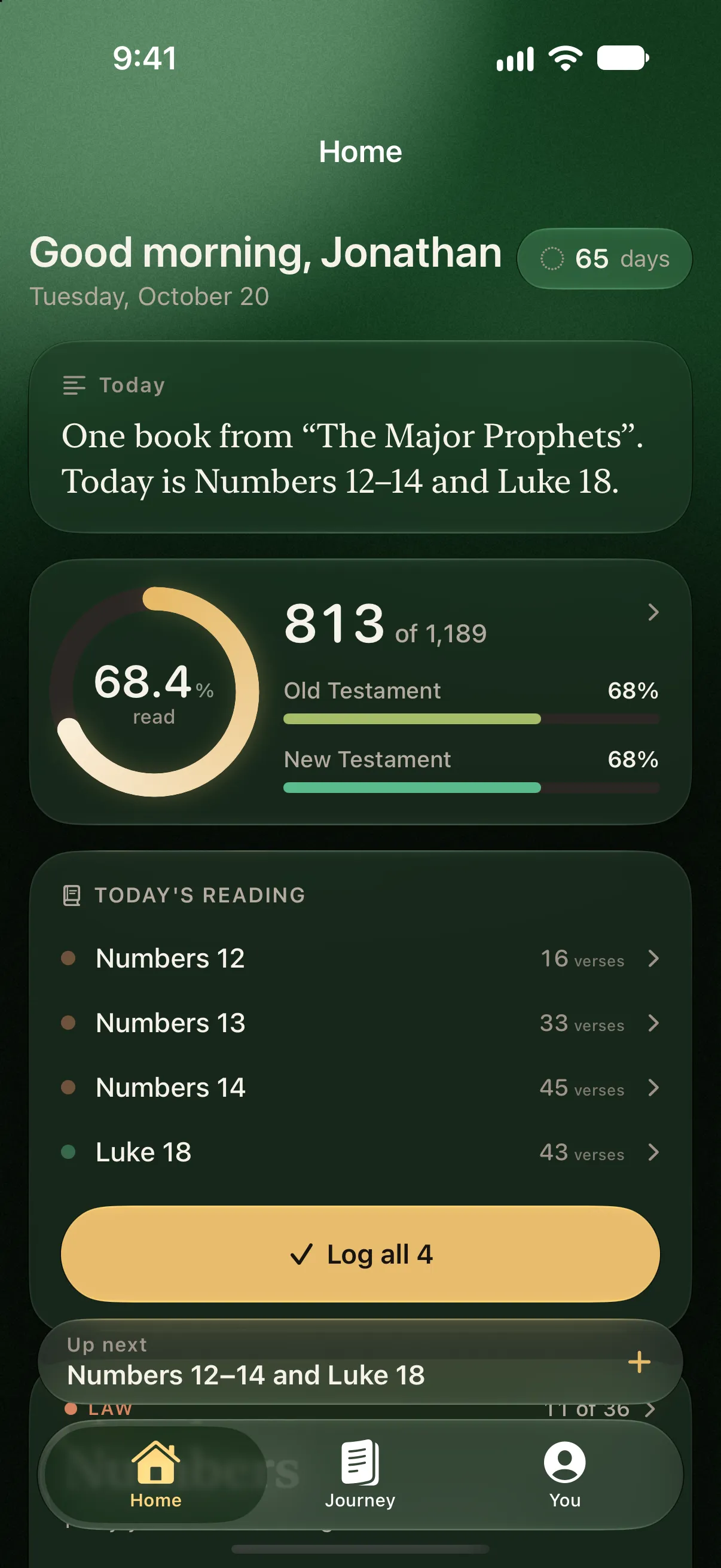
BibleRing is a free Bible reading tracker for iPhone and iPad, and it is our attempt at a tracker that passes all eight checks. Here is how it answers them, in the same order.
It will not suit everyone, and it is fairer to say so here than to let you find out later:
- iPhone and iPad only, on iOS 26 or later. There is no Android version and no web app.
- No Bible text. If you want to read and track in one app, BibleRing keeps only the record.
- Not on the App Store yet. The home page shows everything it does in the meantime.
Sync between your iPhone and iPad goes through your own iCloud, and only if you turn it on. The privacy page lists what the app sends and what it never does.
A five-minute test before you commit
Install the app you are considering, and before you log anything real, run through these:
| Check | Try this | A good sign |
|---|---|---|
| Your Bible | Choose your canon and mark chapter 1 of a book not in the 66 | The total matches your Bible, and the percentage moves |
| Any translation | Mark a chapter read without opening its text | It counts like any other |
| A missed day | See what tomorrow holds if you read nothing today | The plan carries on from where you are, or says plainly that it won’t |
| Corrections | Log a chapter for yesterday, then take it off | Both work, and taking it off asks first |
| Past reading | Mark a book read years ago | The percentage moves; the reading days and the streak do not |
| Widgets and reminders | Tap each one | Nothing is logged until you confirm |
| Privacy | Read the listing’s privacy section and the policy | You know where the record is kept and who can see it |
| Price | Read the listing’s in-app purchases and subscriptions | Your record and your plan never depend on it |
Then take the test entries back off, so the record starts true. After that, the app’s job is small and steady: keep an honest account of the chapters you read, and show you the next one.
Questions people ask
Is there an app to keep track of Bible reading?
Yes, of two kinds. A Bible app with reading plans can mark off a plan's days as you read inside it, and a tracker app keeps a record of chapters read anywhere, in any translation or on paper. BibleRing, which we make, is the second kind, for iPhone and iPad. Whichever you look at, a few minutes of testing (choosing your canon, logging yesterday, taking a chapter back) shows how well it keeps the record.
Is there a free Bible tracker app without ads?
BibleRing, which we make, is built that way. Everything that touches reading is free, with no ads, no subscription and no account, and its one optional purchase is decoration. For any app, the App Store product page can list its in-app purchases and subscriptions, and shows whether the data it collects is linked to you or used to track you.
Can I track Catholic Bible reading (73 books) in an app?
Yes, if the app offers a Catholic canon. The 73-book Catholic Bible has 1,334 chapters, 145 more than the Protestant Bible's 1,189, from Tobit, Judith, Wisdom, Sirach, Baruch, 1 and 2 Maccabees and the longer Esther and Daniel. Mark Tobit 1 as read. If the percentage moves and the total says 1,334, the app is counting your Bible.
Do Bible tracker apps work with a paper Bible?
A tracker that keeps only the record does. You read on paper, or in any other app, and tap the chapters you finished. An app that counts a chapter only when it is read on its own screen would miss your paper Bible, so check that you can mark a chapter read without opening its text. BibleRing ships no Bible text at all, so every chapter is logged that way.
Is there a Bible reading tracker app for Android?
BibleRing is not one. It is for iPhone and iPad, on iOS 26 or later, with no Android version and no web app. On Android, look for the same things, such as your canon, any translation and no backlog after a missed day. An app's Google Play listing has a Data safety section where the developer declares what it collects and shares. A printed chart or a spreadsheet works on any phone, or none.
Does a Bible reading tracker app need an account?
Not to keep a record. A tracker can store everything on the phone and sync through your own iCloud rather than an account of its own. An account makes sense when the record has to follow you to a web browser or another platform, and it generally means a copy on a server the developer runs. A reading record can reveal religious belief, so it helps to know where yours is kept.
Sources
- Regulation (EU) 2016/679 (General Data Protection Regulation), Article 9: Processing of special categories of personal data
- Apple Developer: App privacy details on the App Store
- Apple Developer: Creating your product page (in-app purchases on the product page)
- Google Play Help: The Data safety section on Google Play